Raid DPS meter
Live personal DPS, total damage, share %, crits, ults, CP and HP for raid members, PvE/PvP filter and one-click Excel export.
Tracks raid DPS, all boss respawn timers, hourly spot yield with next-level ETA, and translates in-game chat without touching client memory.
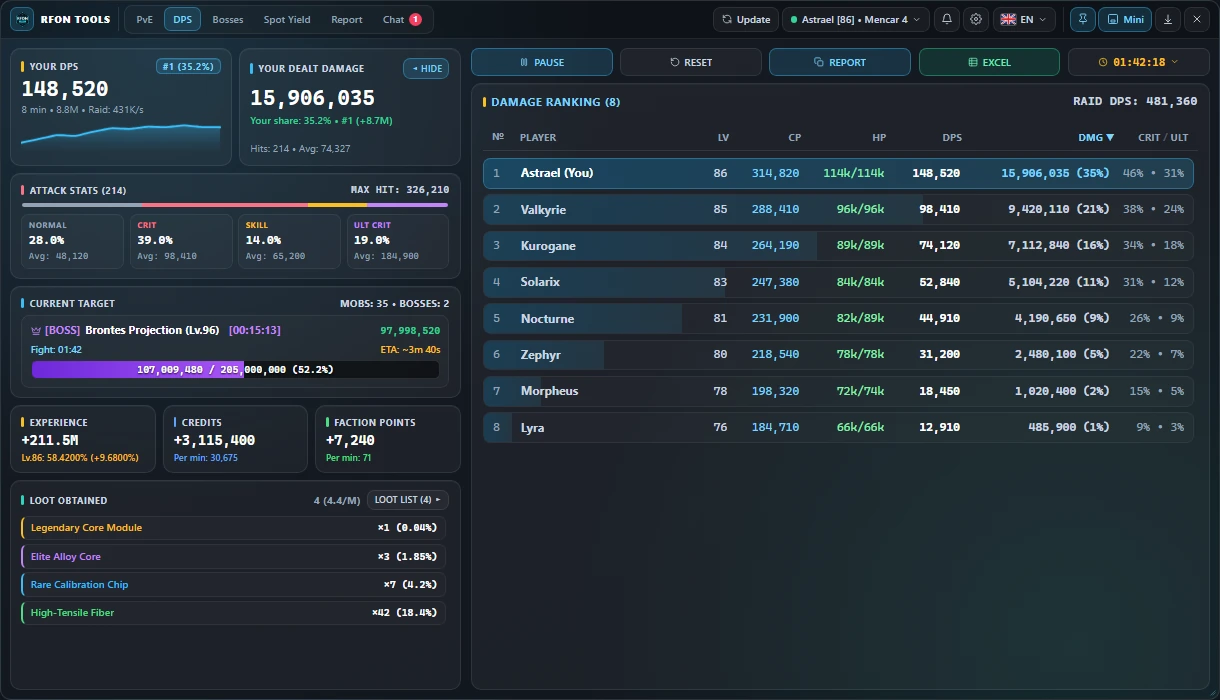
Live personal DPS, total damage, share %, crits, ults, CP and HP for raid members, PvE/PvP filter and one-click Excel export.
Unified schedule for World, Field A–G, Zone, Arena bosses and Projections with instant coordinate paste into in-game chat.
Measures EXP/hr, next-level ETA, credits, faction points and clear speed across 1h, 10h and 24h windows.
Translates Korean, Chinese, Japanese, Russian and Portuguese messages directly in the overlay with channel filters.
Sends alerts for boss spawns, rare drops, auction sales and character attack events when you are AFK.
Click-through transparent overlay, compact Mini-HUD mode and independent tracking for multiple game clients.
Get RFONTools_Launcher.exe directly from this server and optionally verify its SHA-256 hash.
The launcher installs or verifies Npcap on first run and fetches the latest build automatically.
Request a free trial or key in @rfo_next_bot on Telegram or via our Discord server.
No. It does not attach to game memory, patch client files, or send packets. It only reads network traffic passively via the standard Npcap driver.
Administrator rights are required for Npcap packet capture and for rendering a borderless overlay above the game window.
Yes. You can switch active game windows from the header and keep separate character/server profiles.
Updates are delivered directly inside the app header in one click.
Open @rfo_next_bot in Telegram or join our Discord server to activate a trial key or plan.